

Credits
If you’re running a content writing agency, or would like to allow your clients to purchase a fixed amount of credits then use those credits to purchase different services at any point, you’re able to use our Credits feature.
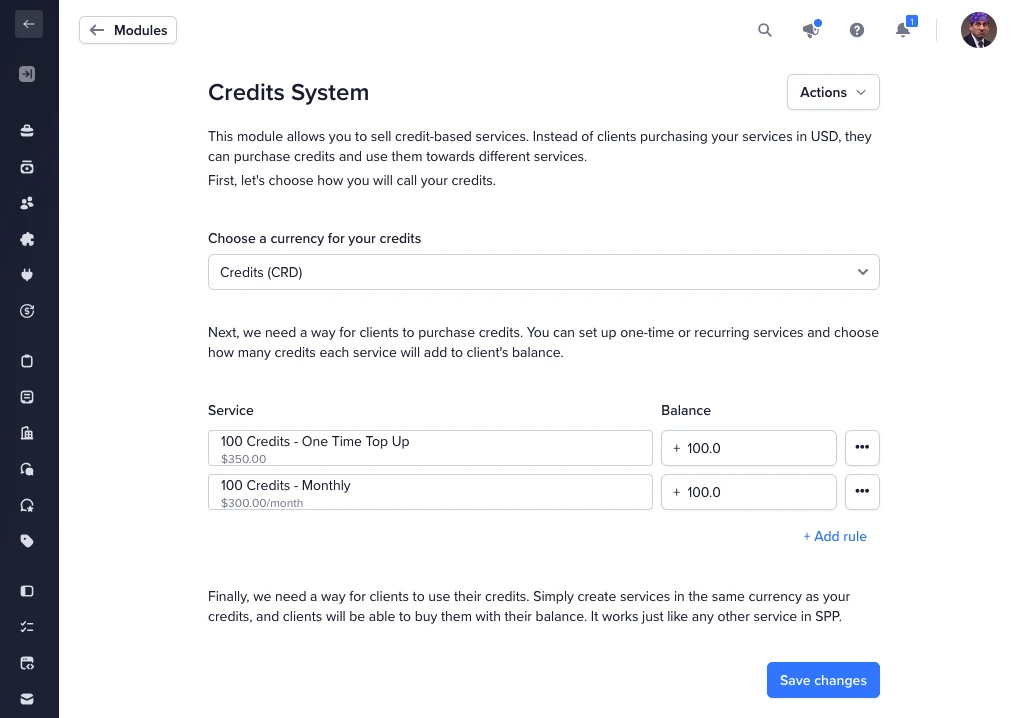
Navigate to Settings → Modules → Credits System to configure the module. Here, you can add rules on how you’d like the module to behave overall, with options like:
The name of the currency you have: Credits, Points, Hours, Minutes, or Words
Add rules to indicate which services give your clients credits and how many credits they get from these services. If you use service variants, you can assign different credit amounts to each variant.
For each rule, you can choose whether credits should add to the existing balance or reset it. Use the menu on each rule to toggle between Add to balance (credits accumulate) and Reset balance (unused credits are replaced). This is especially useful for recurring credit services where you may not want unused credits to carry over.
Credits are issued when the invoice is paid. Once set up, you can price any of your services in the credit currency you chose, and your clients will be able to purchase these services from their portal using their balance.
Balance payments are available for one-time purchases and for recurring services priced in credits. When a client checks out with a recurring credit-priced service, a local subscription is created on your workspace and renews automatically from their credit balance each billing cycle.
To price a service in credits, edit the service and change the currency from your default (e.g. USD) to your credit currency (e.g. WRD or CRD). Clients will then pay for this service using their credit balance instead of real money:

When a client purchases a service that grants credits, the resulting order is automatically marked as Complete since there is no work to deliver.
Keep in mind that clients can only have items of the same currency in their cart. They cannot mix credit-priced services with regular-priced services in a single checkout.
If an invoice that issued credits is refunded, the corresponding credits are automatically deducted from the client’s balance.