


- 01 Choose software around a service package you can sell and deliver repeatedly.
- 02 Match each brief to its paid service so duplicate requests do not create unpaid work.
- 03 A lean stack can work for a small agency. A connected portal becomes useful as clients prepay, reorder, or renew.
For a small agency still refining its offers, start with Stripe, Jotform, and Trello. Add reporting, referrals, or a shared inbox when the service calls for them. Choose Wayfront when you have repeatable packages and want purchases, briefs, delivery, and reorders in one client portal.
With 5 clients, you can probably remember who paid, send a brief manually, and keep delivery moving on a simple board.
As you sell the same packages repeatedly, productized service software becomes useful for keeping purchases, intake, delivery, and repeat orders connected. You can assemble that setup from separate tools or use a platform such as Wayfront.
The right choice depends on how much coordination you're willing to own, and how often your team repeats it.
Why we ended up with a spreadsheet
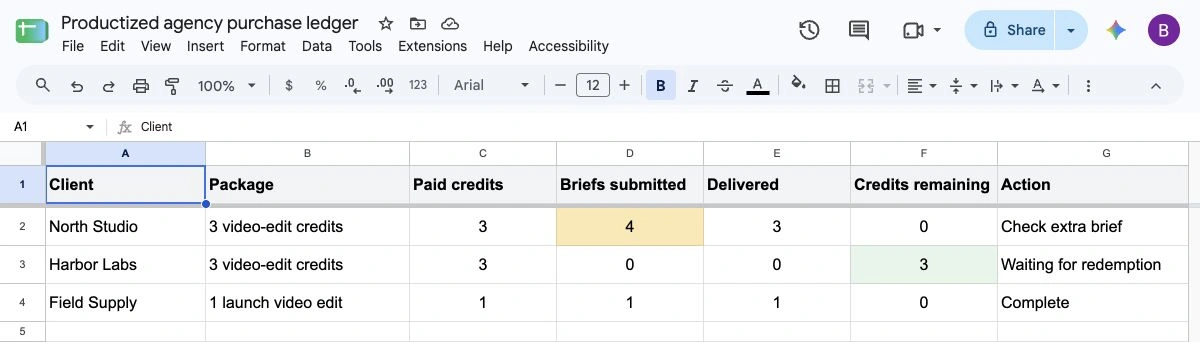
When I ran an agency, a client would buy a package through our billing software. We'd then add their purchase to an internal spreadsheet.
They might fill out the intake form the next day. Or they'd buy ahead of a launch and return much later.
Before starting work, we'd check what they'd paid for, what they'd already requested, and what we'd delivered.
That spreadsheet mattered. A client could submit our standalone intake form several times. Without checking their purchases, we could accidentally deliver more than they'd bought.
We also had clients who prepaid and never came back with a project. That left a purchase sitting there, waiting for work that might never arrive.
Paid, briefed, and delivered are 3 different states. Your software needs a reliable way to keep them connected.
What productized service software should handle
Productized service software helps an agency sell a defined package and run its repeatable delivery process.
For a video-editing package, that might mean taking payment, collecting footage and instructions, assigning an editor, reviewing the edit, and sharing the finished video. For prepaid services, it also means tracking how many edits the client can still redeem.
The service determines the setup. Our productized service examples show how different agencies package their work.
The tools below cover 6 specialist jobs, plus Wayfront as a connected platform. Choose the jobs your agency actually needs.
| Tool | Useful for | Main decision |
|---|---|---|
| Stripe | Payments and subscriptions | How will a confirmed payment become the right work? |
| Jotform | Intake forms and uploads | How will each brief connect to a paid service? |
| Trello | Tasks and visible delivery stages | How will staff and clients see the appropriate level of detail? |
| AgencyAnalytics | Marketing reports and client dashboards | Is reporting a substantial part of the service you sell? |
| Rewardful | An affiliate or referral channel | Are you recruiting partners, or helping clients refer a colleague? |
| Help Scout | A shared support inbox | Who owns incoming questions, and can they see the client context? |
| Wayfront | A connected purchase-to-delivery flow | Are your packages repeatable enough to justify configuring them once? |
The agency story comes from my own experience. I checked product capabilities and pricing against official documentation on October 6, 2026. These tools cover the jobs a productized agency needs to handle: payment, intake, delivery, reporting, referrals, support, and connecting the client workflow.
1. Stripe for payments and subscriptions
Stripe is a sensible starting point when you need to collect money. Payment Links can sell one-time purchases and subscriptions without building your own checkout, and its customer portal lets clients manage billing.
Then decide what happens after payment.
For each purchased package, you need a record of the service, its quantity, and any remaining prepaid entitlement. The person starting work should be able to check that record against the brief.
A small agency can do this with a spreadsheet and a simple automation. As orders increase, give someone responsibility for failed automations, duplicate requests, and payment changes.
Stripe can also remain your payment processor when you move to a connected platform. Wayfront's billing setup uses your payment account while connecting purchases to the rest of the client workflow.
2. Jotform for intake forms and file uploads
Jotform lets you collect client briefs, upload files, show questions based on earlier answers, and capture signatures. You can start with a template and connect submissions to the tools your team already uses.
Check Jotform’s plan limits before using it for every client. The free Starter plan allows 5 forms, 100 submissions a month, and 100 MB of upload storage. Large video files will use that space quickly.
Build the form around what your team needs to start that particular service.
A video-editing brief might need footage and references. An SEO audit needs the website URL and access details. A client booking both services should receive the appropriate questions for each.
Keep reusable brand information separate from project-specific instructions. Our client onboarding form guide explains what belongs in intake.
I also recommend capturing agreement to the service terms in the buying or onboarding flow. Keep the signed terms, payment record, communications, and delivery evidence together.
Stripe lists signatures and relevant communications among the evidence that can support a dispute response. The card issuer decides the outcome based on the dispute and evidence supplied. Stripe dispute guidance.
3. Trello for tasks and client-facing progress
Trello works well when a board gives your team a useful picture of the work. You can organize cards into stages, attach files, set due dates, and use templates and automations.
For a small operation, that may be enough.
Once the internal process gets more involved, think about what the client should see. Your production team may need detailed checklists and assignments; the client may only need their brief, current status, and finished files.
A detailed internal project tool alongside a simpler client-facing board can work, provided changes stay consistent across both views.
Trello also offers card mirroring on paid plans, so check its current capabilities before deciding how much synchronization you need to build.
Our agency project management guide covers the broader delivery process. Choose the project tool around that process.
4. AgencyAnalytics for reports and client dashboards
AgencyAnalytics fits agencies whose deliverable includes showing marketing performance. It connects marketing data sources, builds dashboards and reports, and gives clients branded access to their results.
For an SEO or paid-media agency, that reporting job can justify a specialist tool.
Clients may need 2 updates: how their campaign is doing, and where the next deliverable stands. A rankings dashboard answers the first question. The order status answers the second.
You can use a client portal alongside specialist reporting software. Wayfront's client portal can bring reporting into the client's workspace, while the underlying reporting tool continues to do its job.
5. Rewardful for an affiliate channel
Rewardful is worth considering when you want a dedicated affiliate system connected to your payments. Its features include commission tracking, affiliate links, campaign controls, and adjustments as referred customers change their subscriptions.
First decide who will refer business.
A professional affiliate with an audience has different needs from a happy client who might introduce 1 or 2 colleagues. For that client, another registration process can be more effort than the referral warrants.
I like the Dropbox-style approach for client referrals: make the introduction easy, and give both people a useful benefit. Extra service credit can be one possible reward.
Define the reward, qualifying purchase, and payout process before choosing software. A small client-referral program may work through your existing portal; an established partner channel may justify a specialist system.
Our agency referral program guide helps you make that decision.
6. Help Scout for a shared support inbox
Help Scout is useful when client questions need to move beyond one person's inbox. Its shared inbox gives the team a place to assign conversations, leave notes, and reply together.
That becomes valuable when several people handle onboarding, billing questions, or delivery updates.
Decide how the person answering will find the relevant purchase, brief, and project. The person replying should be able to find the answer without asking 3 teammates what happened.
Contact forms should feed the same process, with an owner for each inquiry.
If you already rely on a dedicated help desk, check the context available through its integrations before replacing it. Wayfront's shared inbox is another option when you want conversations connected to the client's orders and invoices.
7. Wayfront for the connected client workflow
Wayfront fits an agency that has defined repeatable packages and wants clients to buy, submit briefs, follow work, and purchase again through one branded portal.
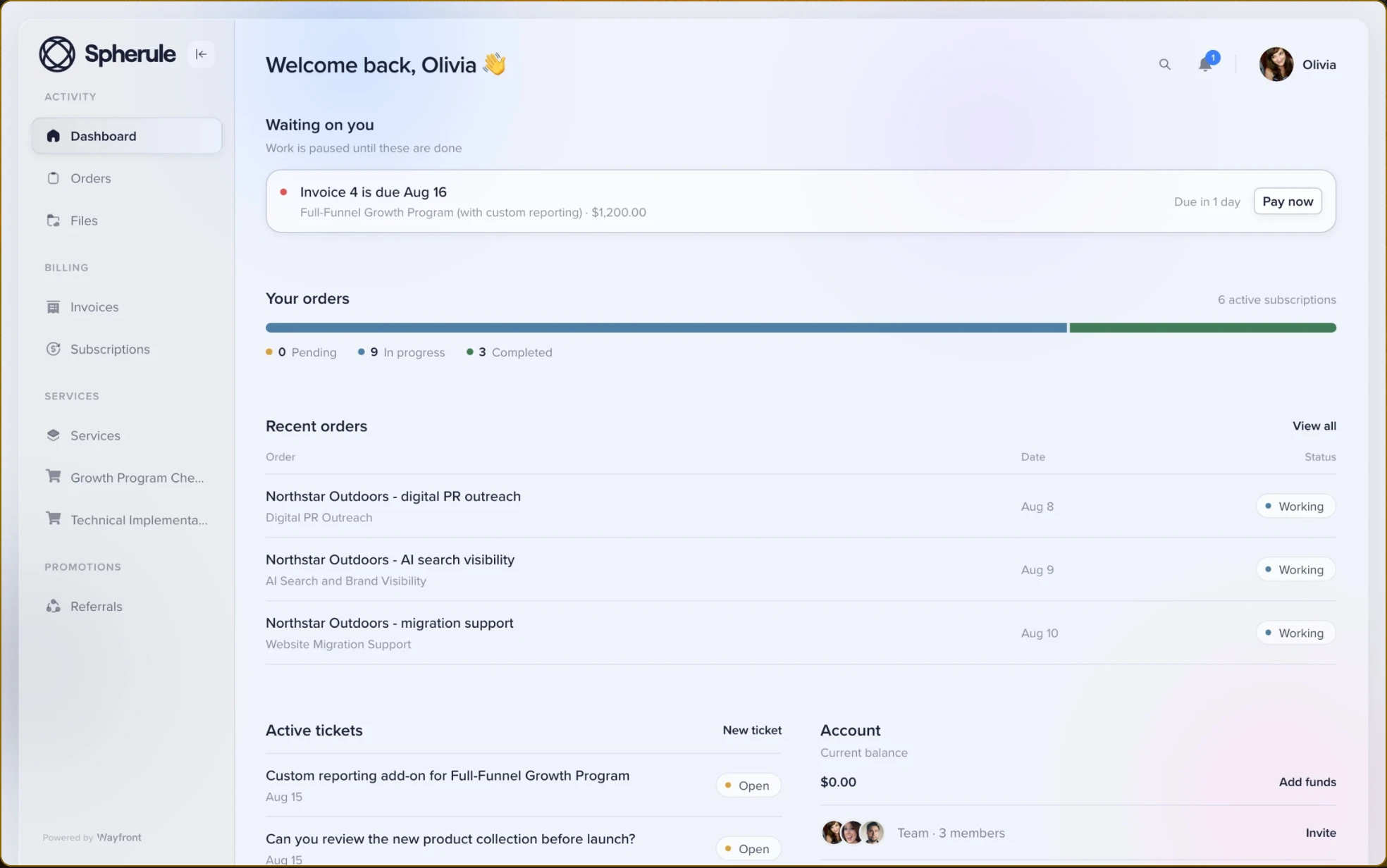
The setup takes thought. For each service, you define:
- The price and what the client receives.
- The intake information needed to start.
- The SOP, steps, and tasks.
- The people responsible for those steps.
- The way repeat purchases or renewals create work.
You do that once, then reuse the service.
Our guide to implementing productized services covers the work of defining the offer before configuring software.
Connect each purchase to its delivery process
A paid delivery service can create an order with the appropriate intake, tasks, and assignments. Your team moves it through its production stages, and the client has a place to follow progress and communicate.
Wayfront's form builder distinguishes reusable client onboarding information from the brief for a specific project. Clients can save unfinished intake and return when they're ready.
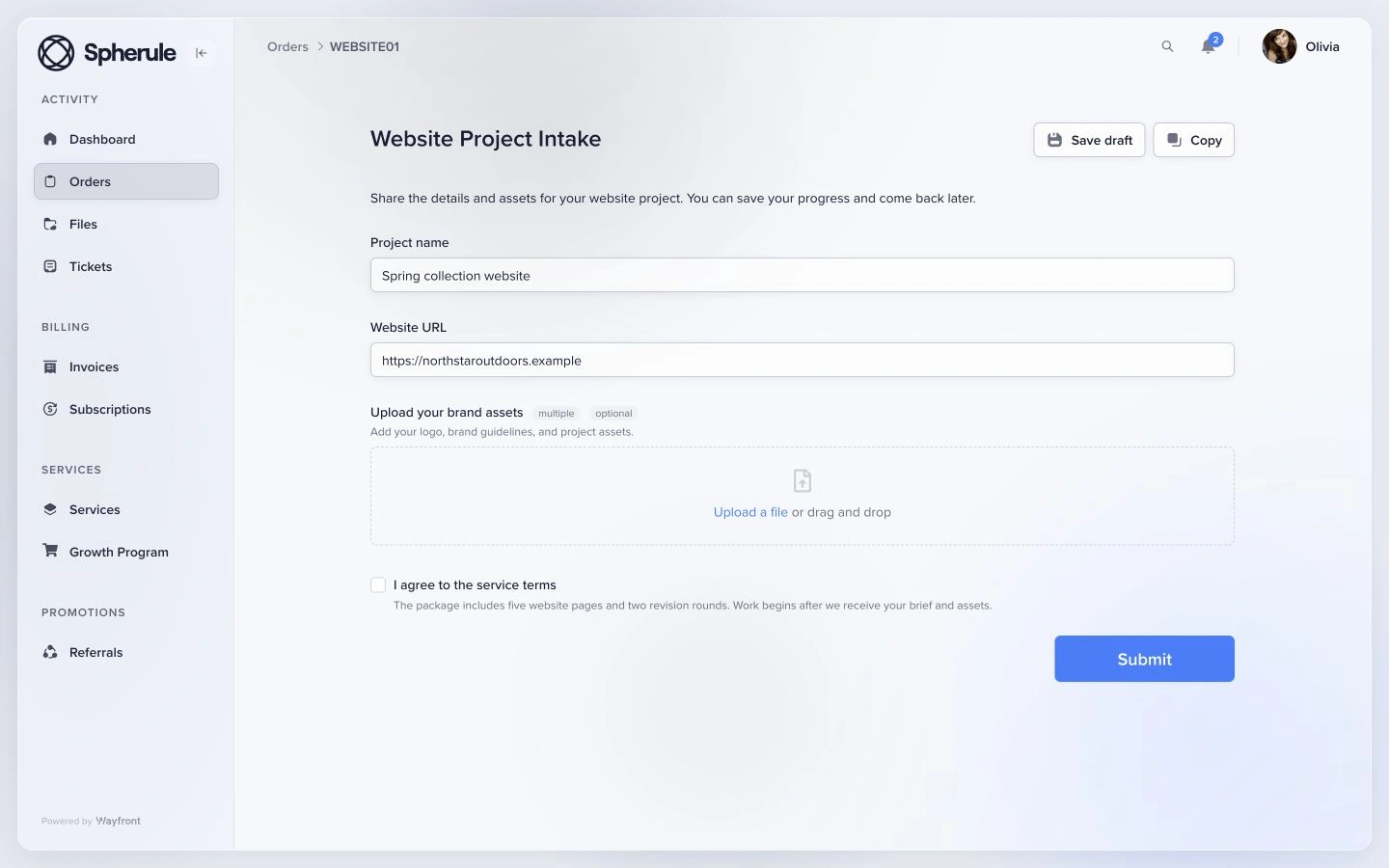
For subscriptions, define what each renewal means. You might reopen an ongoing order, create fresh work each month, or let clients submit requests within their package.
The right behavior depends on what you've sold.
Let clients prepay and return when they're ready
An upcoming launch is a good example. The client wants to buy now, but their assets or instructions will be ready later.
With prepaid credits, they can return to the portal, see their balance, and redeem credits for the work when they need it. They have a clear place to pick up where they left off.
Wayfront's credits system issues credits when the credit pack is paid for. You set how many credits each eligible service requires, and clients redeem their credits for those services later.
Buying the credit pack adds to the balance without starting production work. Redeeming credits for a service creates the delivery order.
For example, a video-editing agency could sell a pack of 3 credits, with each edit requiring 1 credit. A client buys the pack ahead of a launch, then returns a month later to redeem 1 credit for a video edit and upload their footage. Their remaining 2 credits stay available for later work.
You can choose whether recurring credit purchases add to the balance or reset it. Make that rule clear to clients, along with how refunds affect their balance.
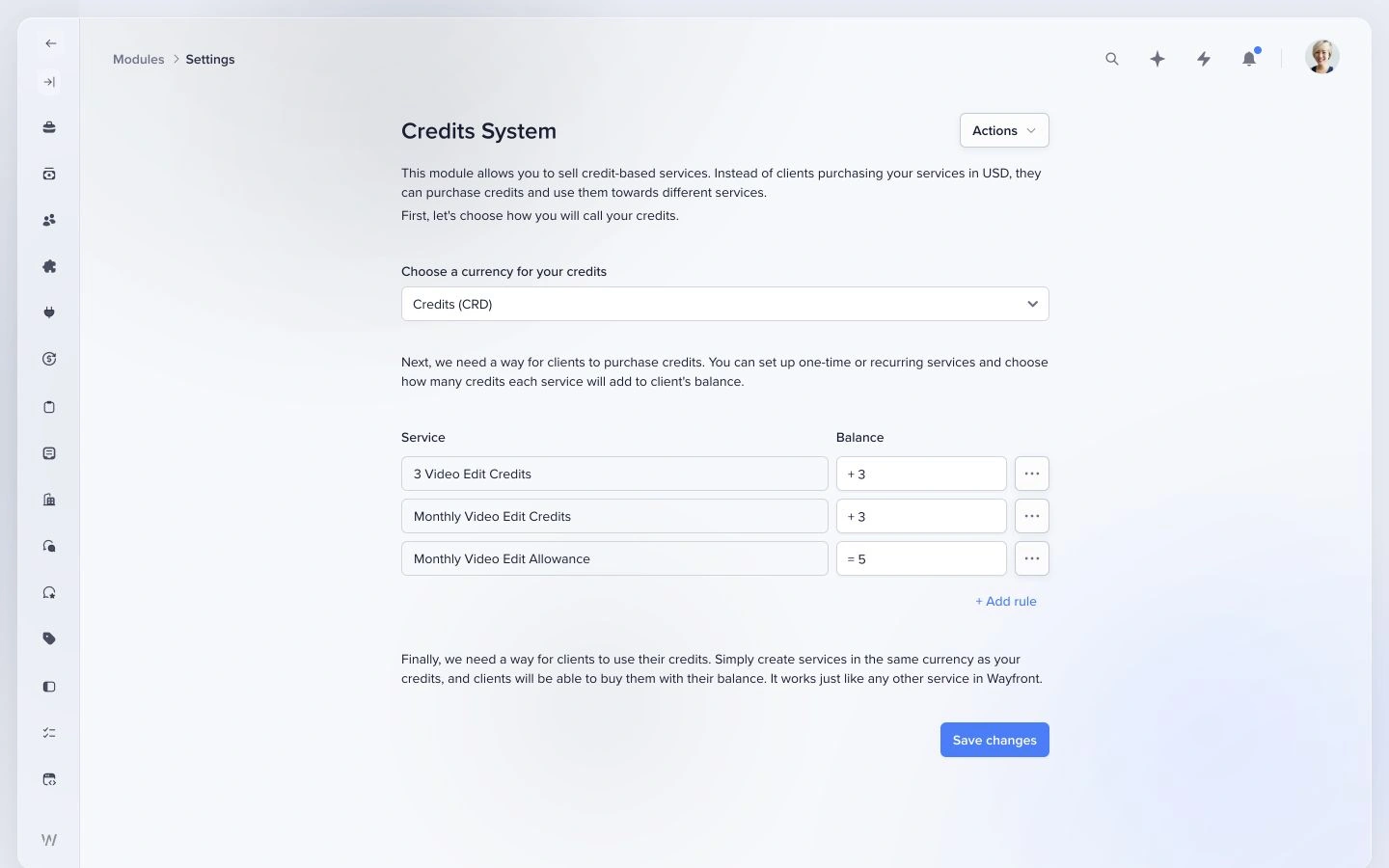
A monetary account balance is another setup. Enabling the credits module replaces that currency with your chosen credit unit, such as hours or video edits.
Give staff detail and clients clarity
Staff need tasks, assignments, and internal notes. Clients need the information that helps them provide a brief, understand progress, and review the work.
Wayfront keeps those views around the same order. You can keep a specialist project tool for deeper internal planning when your team needs it.
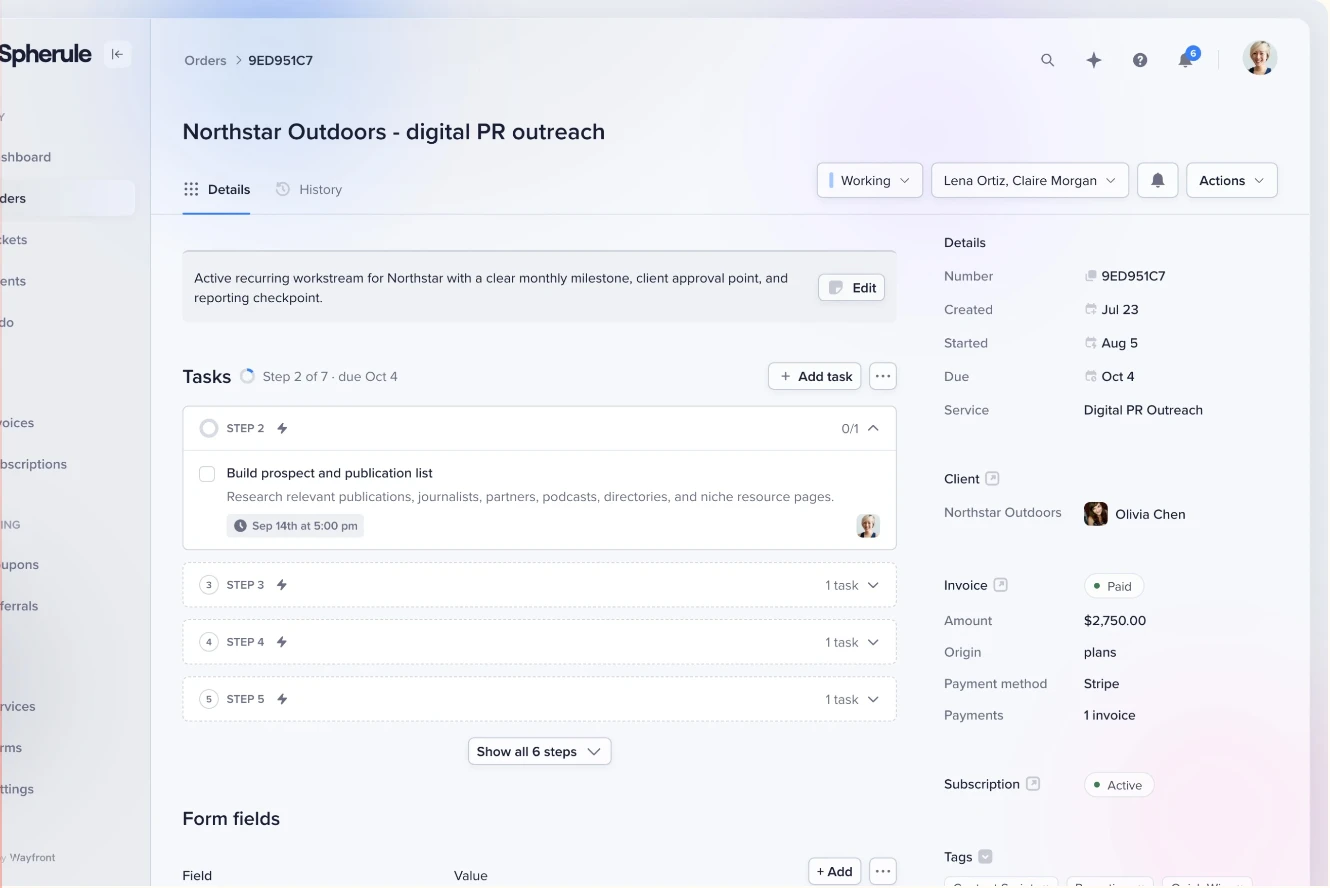
To see whether a package is profitable, its time tracking supports timers and manual entries, with totals by team member and order. Use that information to review how much work a package actually takes.
Keep useful flexibility
A reusable service can still have special commercial terms. You might invoice a particular client at a different price, use a first-payment coupon, or offer a trial on a recurring service.
Keep the package and its delivery steps reusable. Decide which clients can get a different price.
Wayfront also includes contact forms, a help desk, invoices, and client referral features. AI tools can access permitted workspace context through its MCP connection, which is useful if you're already working with client and order data through AI.
Which setup makes sense for your agency?
Keep it lean while the work is manageable
If you have 5 clients, know who paid, and can reliably match their briefs to their purchases, a few separate tools may serve you well.
Manual delivery and small automations give you flexibility while you refine your packages. You'll have fewer reusable rules to configure upfront.
Choose a connected platform when the same defined services are being sold repeatedly and the handoffs are becoming a regular job for your team. The case gets stronger when clients also prepay, reorder, or renew.
Count the handoffs your team has to check each week. An agency with 5 clients buying 10 services each may need this sooner than one with 20 clients on a single ongoing retainer.
Keep specialists that earn their place
A reporting platform may still be useful alongside Wayfront. So might dedicated video proofing, SEO research, or a project tool with the planning features your team relies on.
If each sale requires a new proposal, a new scope, and a substantially different production process, software designed around custom projects deserves a look.
For other integrated options, our client portal software guide compares different operating models.
What does productized service software cost?
Look at the setup you'll actually use. A small agency might start with free forms, a free board, and payment processing, then add specialist tools as a particular need appears.
| Tool | Pricing starting point checked October 6, 2026 |
|---|---|
| Stripe | Payment processing fees; Stripe Billing has separate pricing. Its pay-as-you-go rate is 0.7% of Billing volume. |
| Jotform | Free Starter plan: 5 forms, 100 submissions/month, and 100 MB upload storage; paid plans increase limits and remove branding. |
| Trello | Free for up to 10 workspace collaborators and 10 boards; Standard is $5/user/month billed annually or $6 monthly. |
| AgencyAnalytics | Core plan displayed at $20/client/month billed annually; volume pricing and optional add-ons can change the total. |
| Rewardful | Entry plan starts at $49/month, with limits tied to affiliate-attributed revenue. |
| Help Scout | Free plan includes 5 users, 1 inbox, and 1 Docs site; paid plans add capabilities. |
| Wayfront | Base is $129/month, or $99/month billed yearly, including 5 team seats. Check the required features and plan. |
Payment processor fees remain part of a Wayfront setup. Wayfront adds no transaction fee.
Then account for configuration, integrations, and the time spent reconciling the work. An inexpensive stack can be a good choice when someone can maintain it comfortably.
An integrated platform has its own setup cost: defining reusable packages and moving the relevant client information. Compare both approaches against the services you sell.
Frequently asked questions
Can I run a productized agency with Stripe, a form builder, and Trello?
Yes. Stripe takes payment, the form collects the brief, and Trello tracks delivery. You'll need a way to match each request to a paid service, track remaining credits, and keep client updates consistent. That can be manageable while your order volume is small.
What's the difference between a client portal and a project management tool?
A project management tool organizes the team's tasks. A client portal gives clients a place to see their purchases, submit briefs, follow progress, and retrieve finished work. For a productized agency, check how the portal connects those requests to payment and the team's delivery process.
Can I build my own productized service portal?
Yes, if your agency can own the software and its ongoing maintenance. Include billing changes, account permissions, purchase records, and support in that decision.
A useful test is who will fix the flow when a payment succeeds but the next step fails, or when the service changes after launch.
How do I know a package is ready to configure?
Write down its price, scope, required inputs, delivery steps, and assignments. Check whether the team can use those rules for the next purchase.
If you're still changing the offer for every client, refine it with a simpler setup first. Our service pricing guide can help with the commercial part.
Test one service before moving everything
Pick a package you already deliver. Run it through your proposed setup as a client would.
- Buy it. Check the selected service, payment record, invoice, and next step. If it grants credits, check how the balance appears.
- Request and deliver the work. Submit the brief, attach a file, assign the work, send an update, and share the deliverable. Check how another submission or request is matched to paid entitlement.
- Come back for the next project. Redeem remaining credits or buy another package. For a recurring service, check the renewal's effect on work and the client's view.
Use a pilot client or test account before migrating the rest. Give the team a way to check the original payment records, balances, and active work during the move.
If you'd like to try the connected approach, start a 14-day Wayfront trial and configure that one package. You'll learn more from buying and delivering it than from comparing another page of feature checkboxes.


